EBONEXEBONEX
The platform

What is actually inside EBONEX.

You talk to one agent in plain language. Behind that sentence there is a workspace: a memory that keeps your project, tools that do real computation, a machine of your own, and a place where everything it produced is waiting for you. This page is that workspace, part by part.

Agents

One agent for a study. A team of them for a project.

An agent is not a chat window. It plans, asks for your approval, runs the work on your machine, reads what came back and writes it up.

ebonex.co.uk
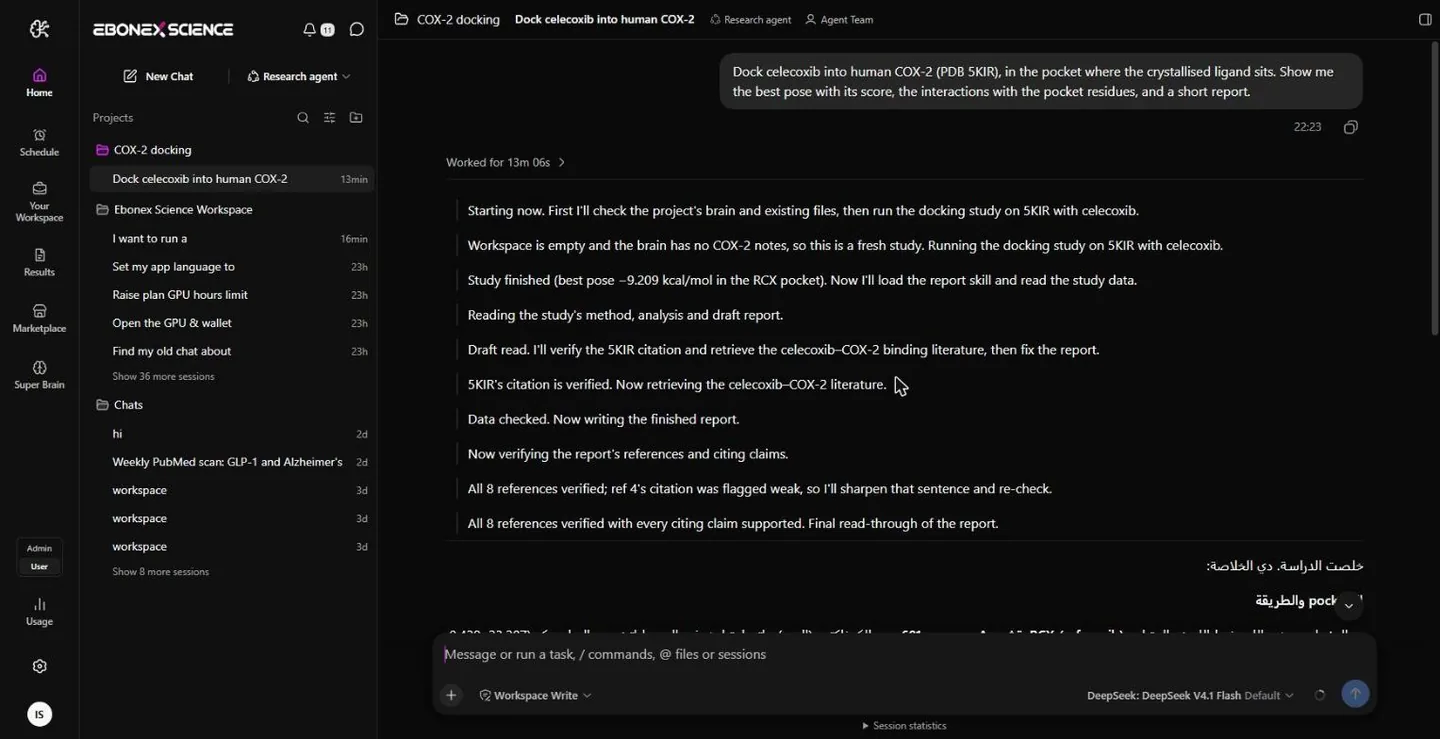
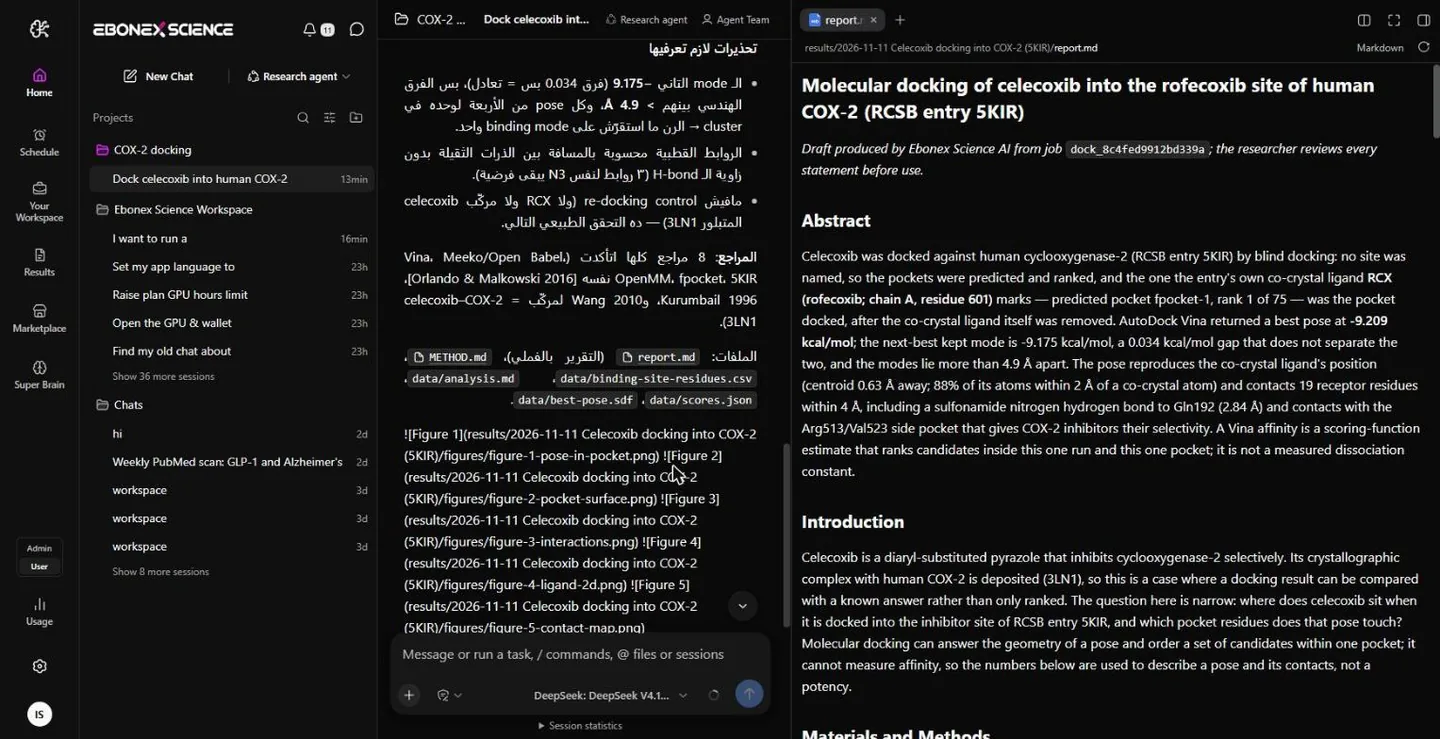
The EBONEX agent chat working through a docking request, step by step

The agent

You describe the question; it decides the method, shows you a plan with its time and its cost, and waits. After your yes it does the work — fetching the structures, running the tools, reading the output, drawing the figures — and every step it took stays visible in the chat, so you can see what it did rather than take its word for it.
ebonex.co.uk
A report open in the side panel beside the agent chat

Agent Teams

A study large enough to need several hands gets them. An Agent Team is a roster of agents and a list of shared tasks: each task has a subject, an owner, the tasks it is blocked by and the files it is allowed to write. They work in parallel where the tasks allow it and wait where they do not, and you can open any teammate’s conversation and read what it is doing.

My Assistant Ebo, the assistant that sits in your chat, is yours to shape: four forms, five personas — general, child, student, researcher, business — ten expressions and your own colours. It is a small thing, and it is the difference between software and someone you work with.
Nothing heavy without your yes Before a job that costs time or credits, the agent shows one card: the method, why it chose it, how long it expects to take and what it will spend. You approve it once, or you do not, and nothing starts meanwhile.
Schedule Work that should happen without you — a weekly literature sweep, a run that starts tonight — goes on the schedule and the agent picks it up at its time. The result is waiting when you come back.
Super Brain

The part that remembers, so you stop repeating yourself.

Every project gets a second brain: facts, decisions, methods and sources. Everything you add, and everything the agent learns about you and your work, is saved there the moment it happens — and read back before it answers you again.

ebonex.co.uk
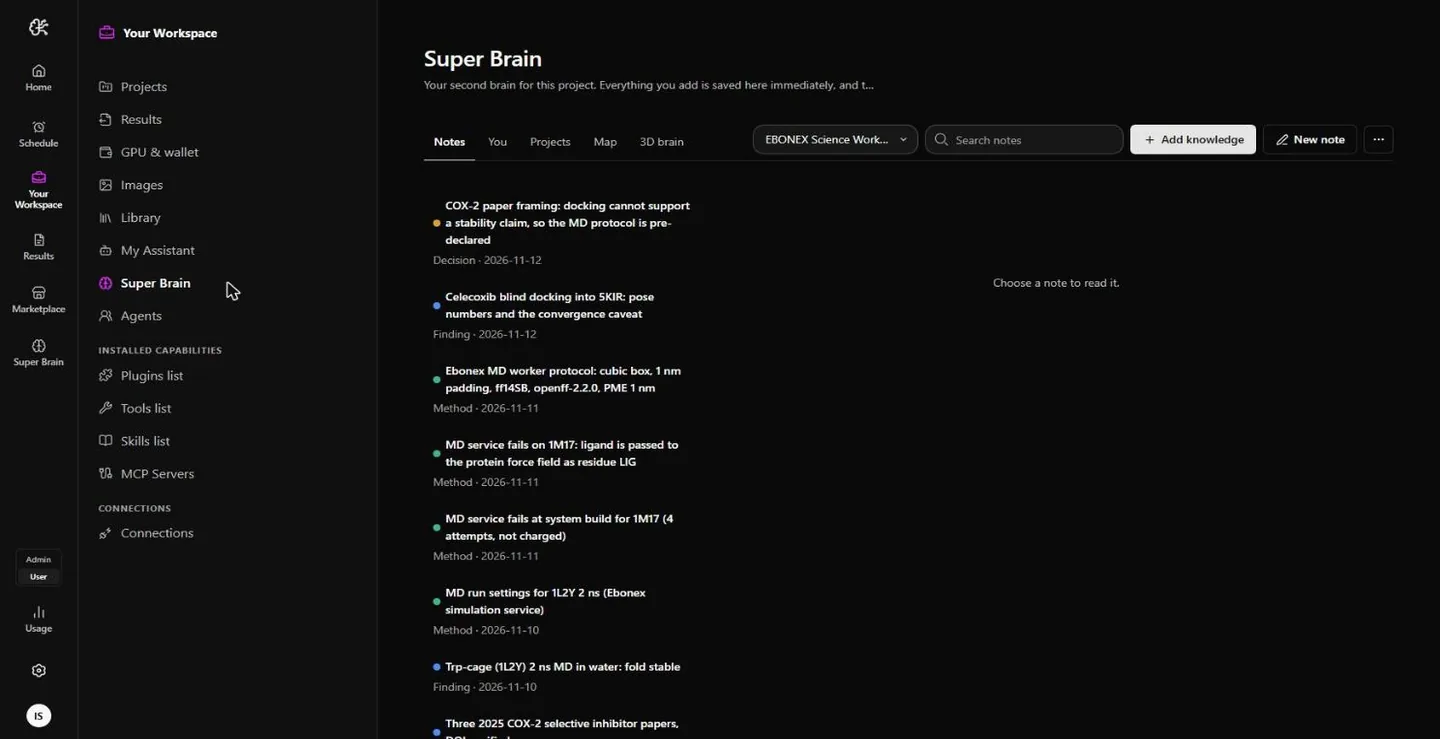
Super Brain Notes: typed and dated notes belonging to a project

Notes that outlive the conversation

A chat ends; what you established in it should not. Protocols you settled on, a concentration you decided to use, the paper that contradicted you, the reason you dropped a method — each becomes a note with its kind and its date. You can type them yourself, drop in text files or a whole folder, and the agent writes its own as it learns. Nothing is buried in a transcript you would have to scroll back through.

ebonex.co.uk
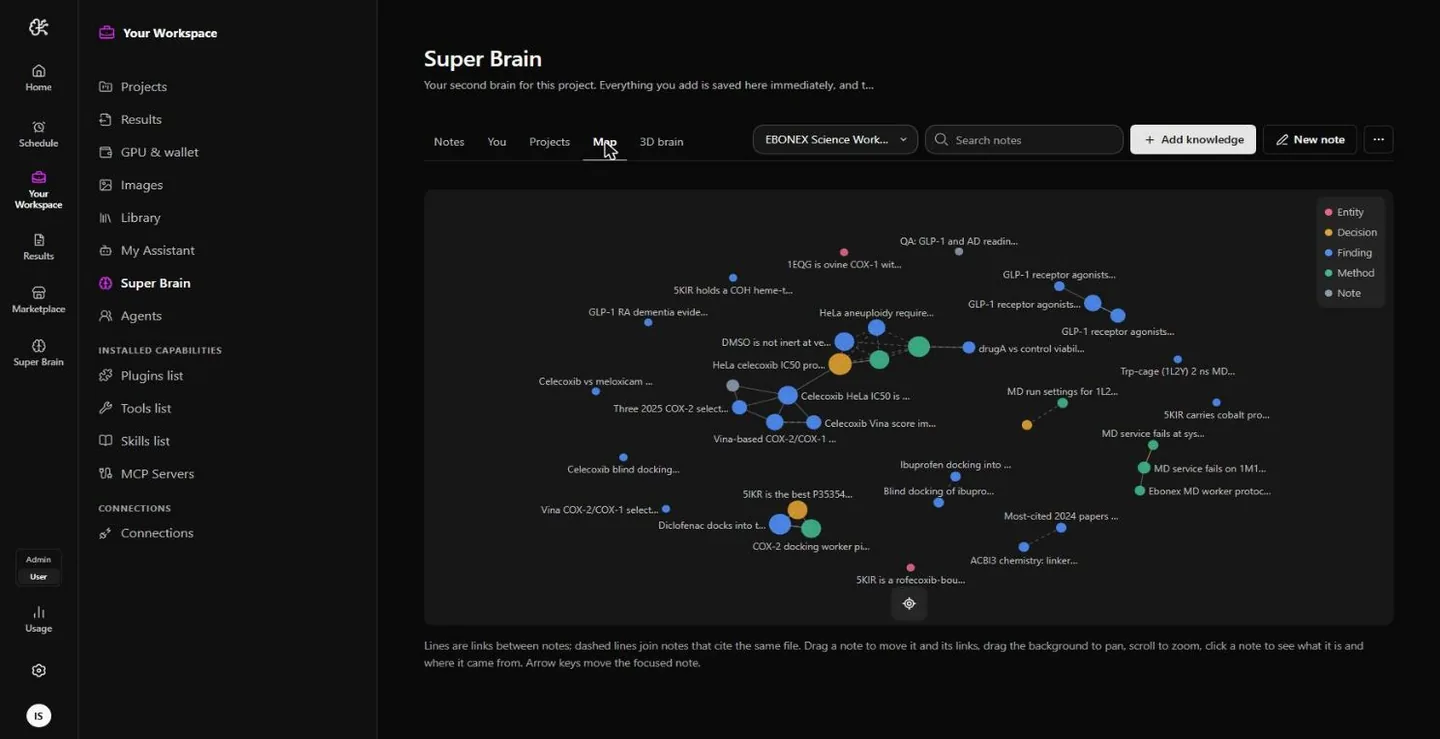
The Super Brain knowledge map: notes as points, linked by how they relate

The map: how your knowledge connects

Notes are not a list. The brain records how two of them relate — one defines another, one contradicts another, one depends on another — and draws that as a map. Asking it to review a project means asking it to read the related notes and tell you, in plain words, what in your own work disagrees with itself. That is the question nobody has time to ask by hand.

ebonex.co.uk
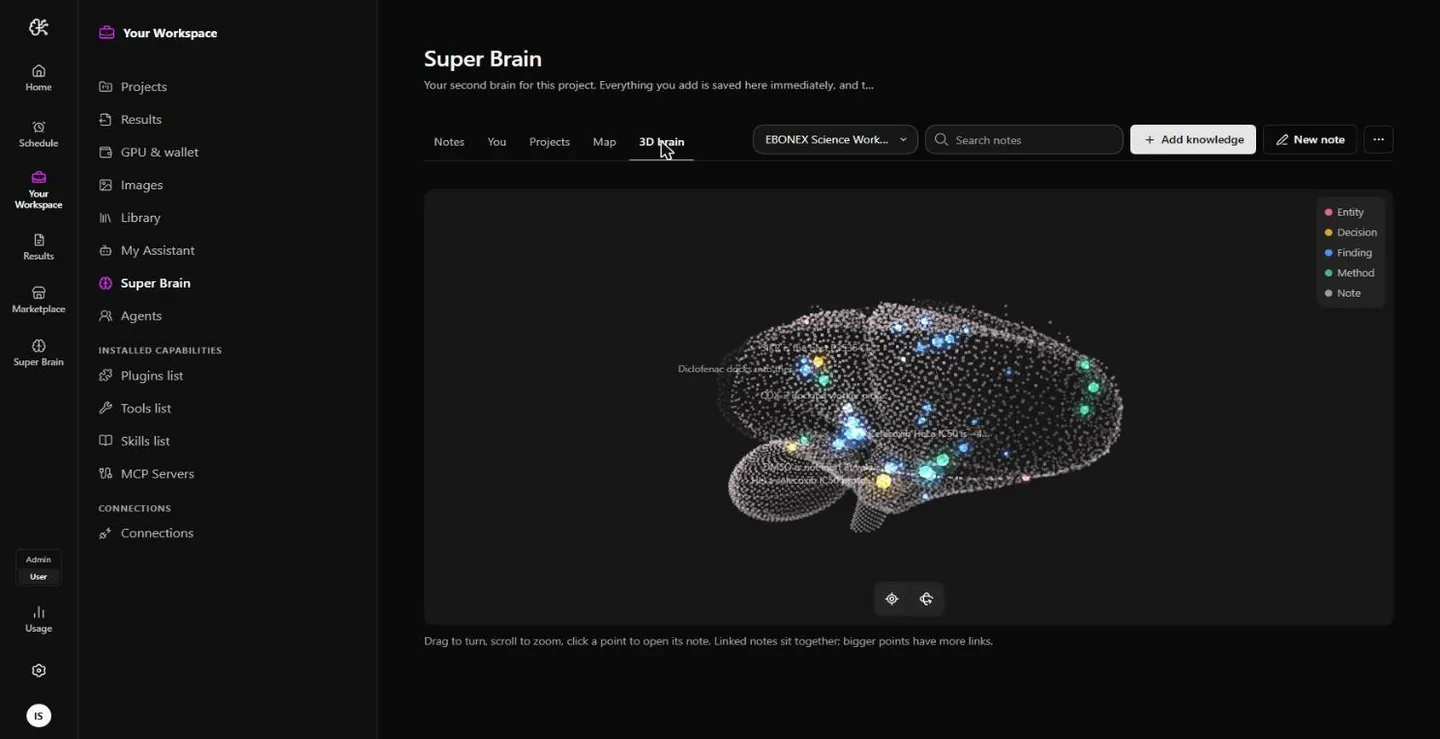
The Super Brain 3D view: linked notes sitting together, larger points carrying more links

The 3D view, and a memory that follows you

Turn the brain, zoom in, click a point to open its note: linked notes sit together and the bigger points are the ones everything else hangs off, which tells you where the weight of a project actually is. Beside the per-project brains there is a personal memory shared by all of them — your language, your units, your style, your university and courses — read at the start of every conversation, and yours to change or delete at any time. A brain can be exported, encrypted, and imported back.

Tools, Skills, Plugins, MCP

What the agent can reach for.

An agent on its own can only talk. These are what let it do things — and all of them are things you can add, switch off, or build yourself.

ToolsThe only one of these that does work. A tool exposes named operations the agent can call — fetch a structure, run a docking job, read a trajectory — and declares what access it needs before you add it. Your Tools list holds everything the assistant can use in your chats.
SkillsWritten instructions the agent loads when a study calls for them: how to judge a pose, how a methods section should read, which checks a result has to survive before you trust it. A skill runs nothing — it changes how carefully the work is done.
PluginsA bundle. A plugin carries skills, and it can declare an ordered chain: the steps of one study, each performed by one tool operation or one skill. That chain is why you can ask for “a molecular dynamics study” once instead of sequencing the simulation, the analysis, the figures and the report yourself.
MCP serversA service outside EBONEX, joined to the agent’s tool list while it is connected: PubMed, Paper Search, Crossref, OpenAlex and anything else that speaks the Model Context Protocol. Sign-in details are stored as references, never as values anyone can read back.
ConnectionsThe services you already live in — Gmail, Google Calendar — connected to your workspace so the agent can read what it needs and put what it produced where you will find it.
ModelsEBONEX AI is included with every account, and you choose how hard it should think about a given task. If you would rather use a key of your own, you can.
ebonex.co.uk
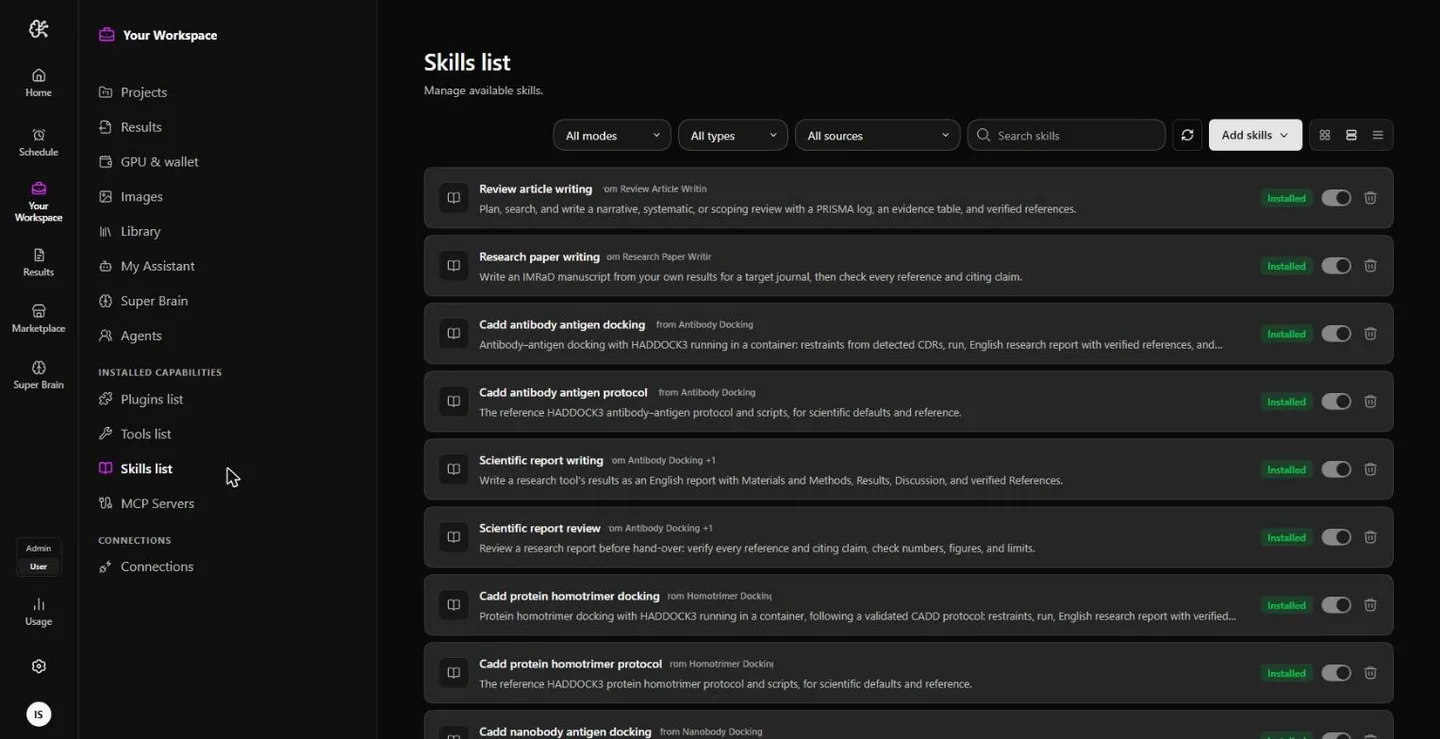
The Skills list in Your Workspace, each skill with its own switch

Everything has a switch

Your Workspace lists every skill, every tool and every MCP server you have, each with its own switch. Nothing is on because someone decided it should be: you turn on what this project needs and leave the rest off. A skill you want but do not have can be written in the app — an identifier, a description and the instructions — without a file and without code.

ebonex.co.uk
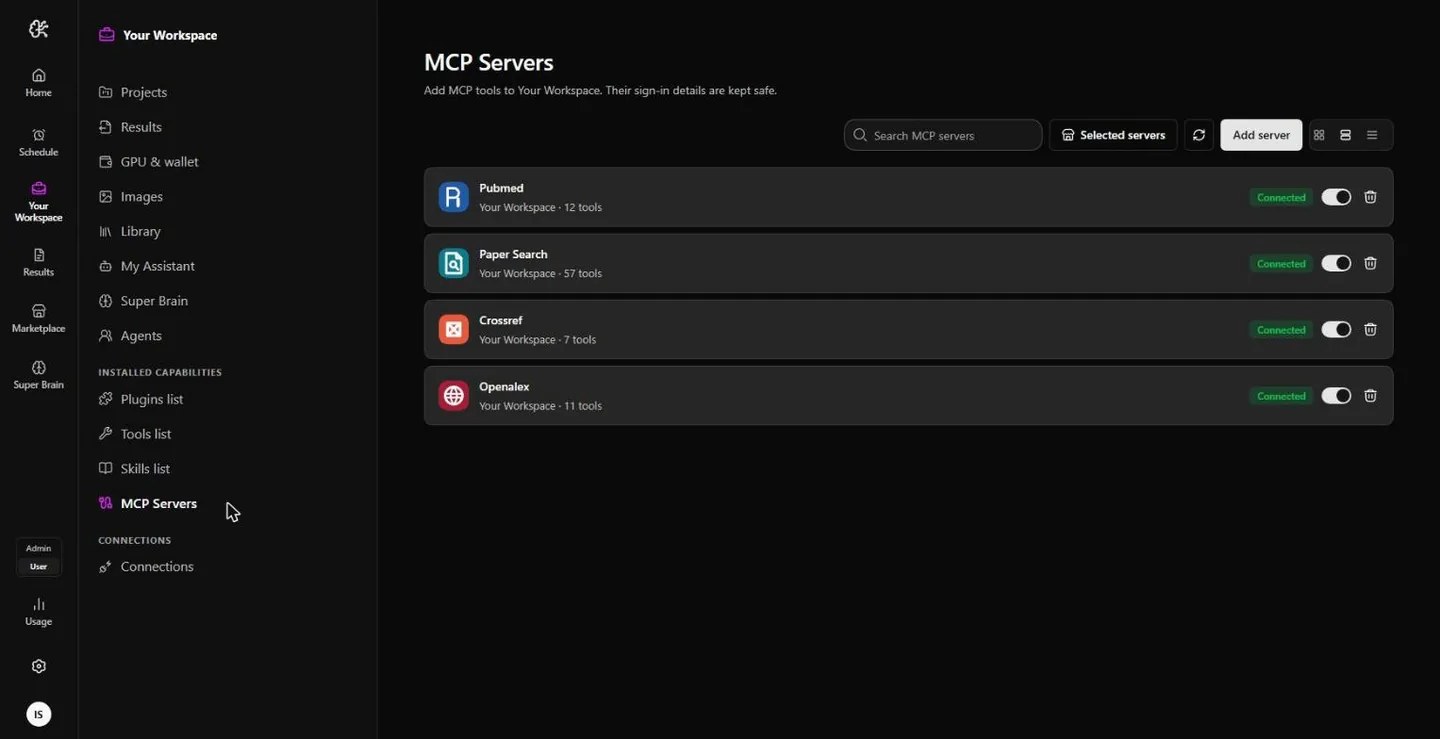
MCP Servers with PubMed, Paper Search, Crossref and OpenAlex connected

The literature, connected properly

PubMed, Crossref and OpenAlex are not pasted into a prompt — they are servers the agent queries while it works, which is why a reference in your report can be checked against the record it came from rather than hoped about. Adding one takes a name and a URL.

Projects, Results, your machine

Where the work lives, and where it lands.

A project is a research folder with its own files, chats and brain. A result is a finished study you can still open in six months and retrace.

ebonex.co.uk
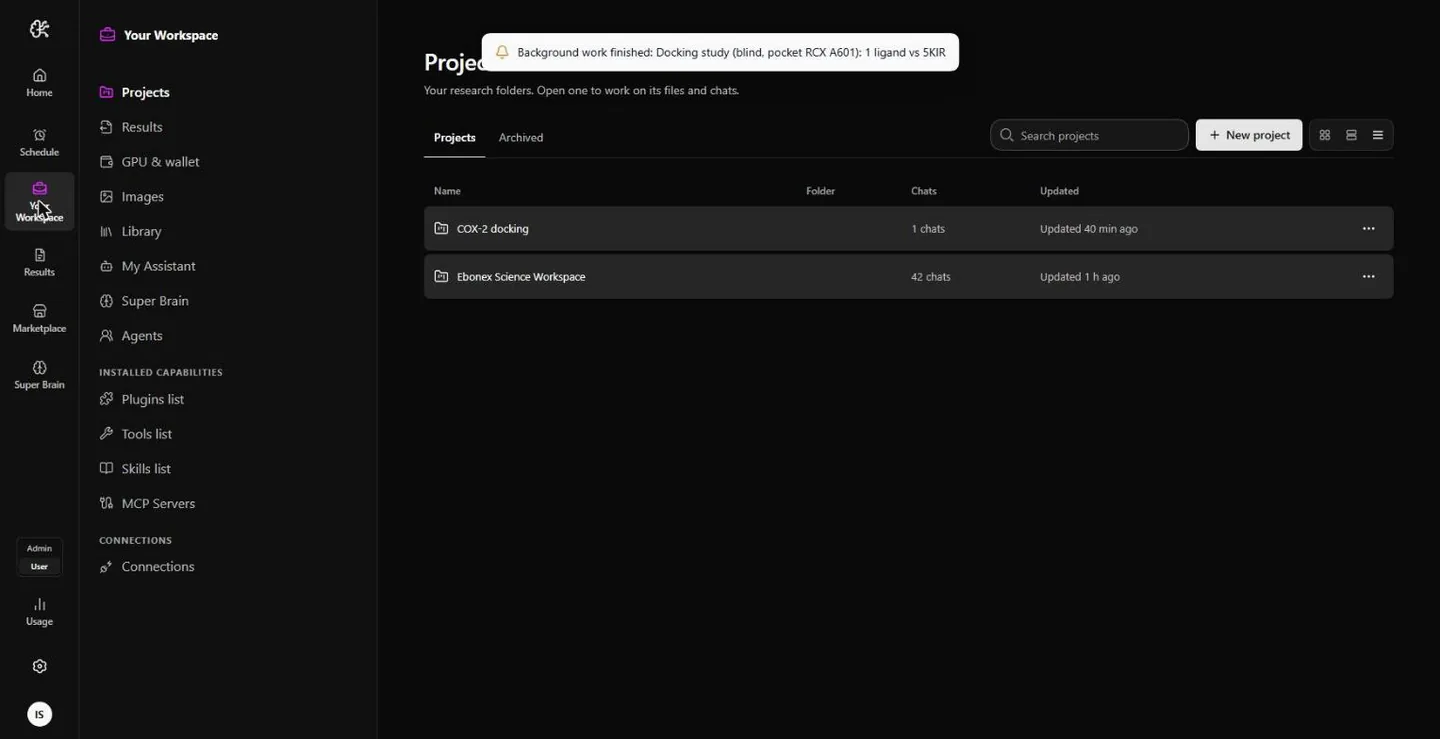
Your Workspace: the list of research projects

Projects

Your research folders. Open one and you get its files, its chats and its own Super Brain; close it and none of that leaks into the next one. The Projects view also shows every project from outside — where it stands and what its next step is — which is the view you want on a Sunday night rather than at the bench.

ebonex.co.uk
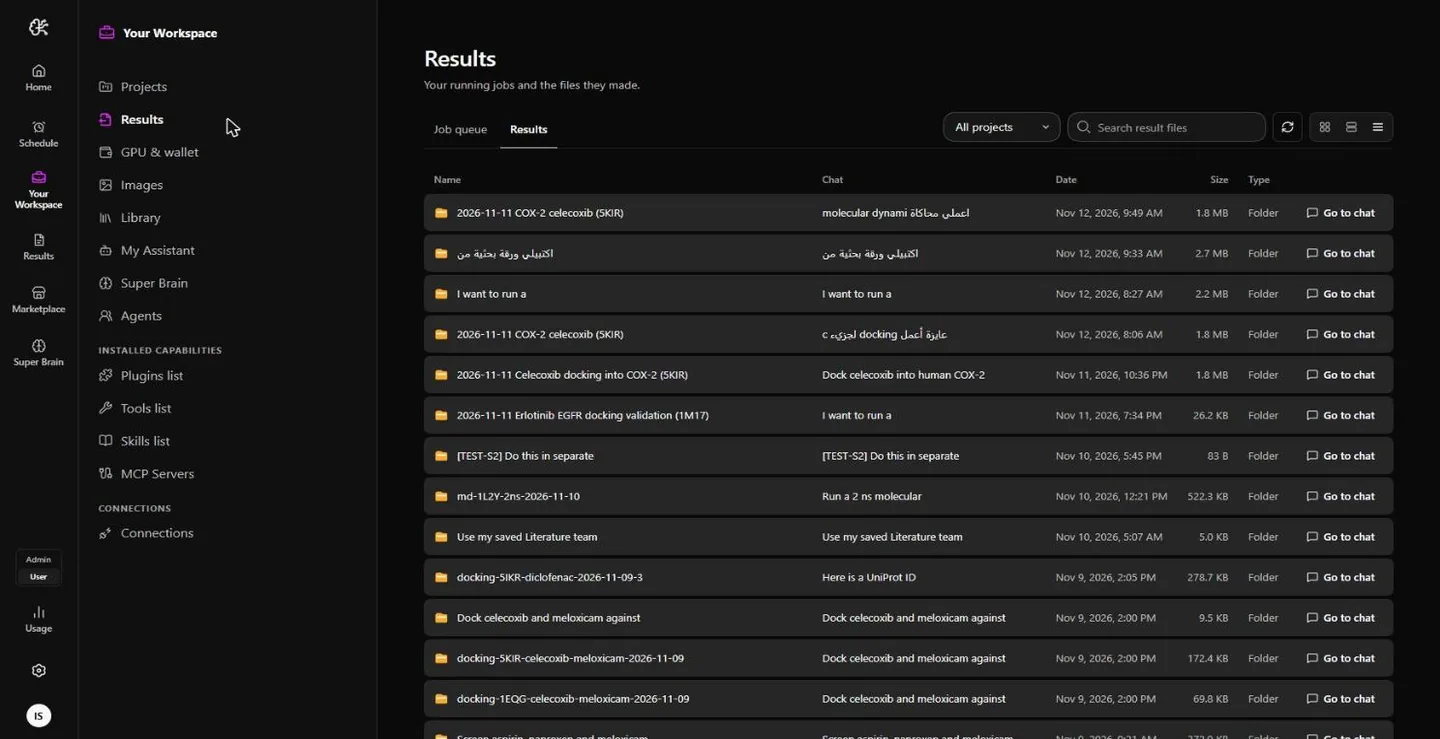
Results: one folder per study, each with a link back to the chat that made it

Results

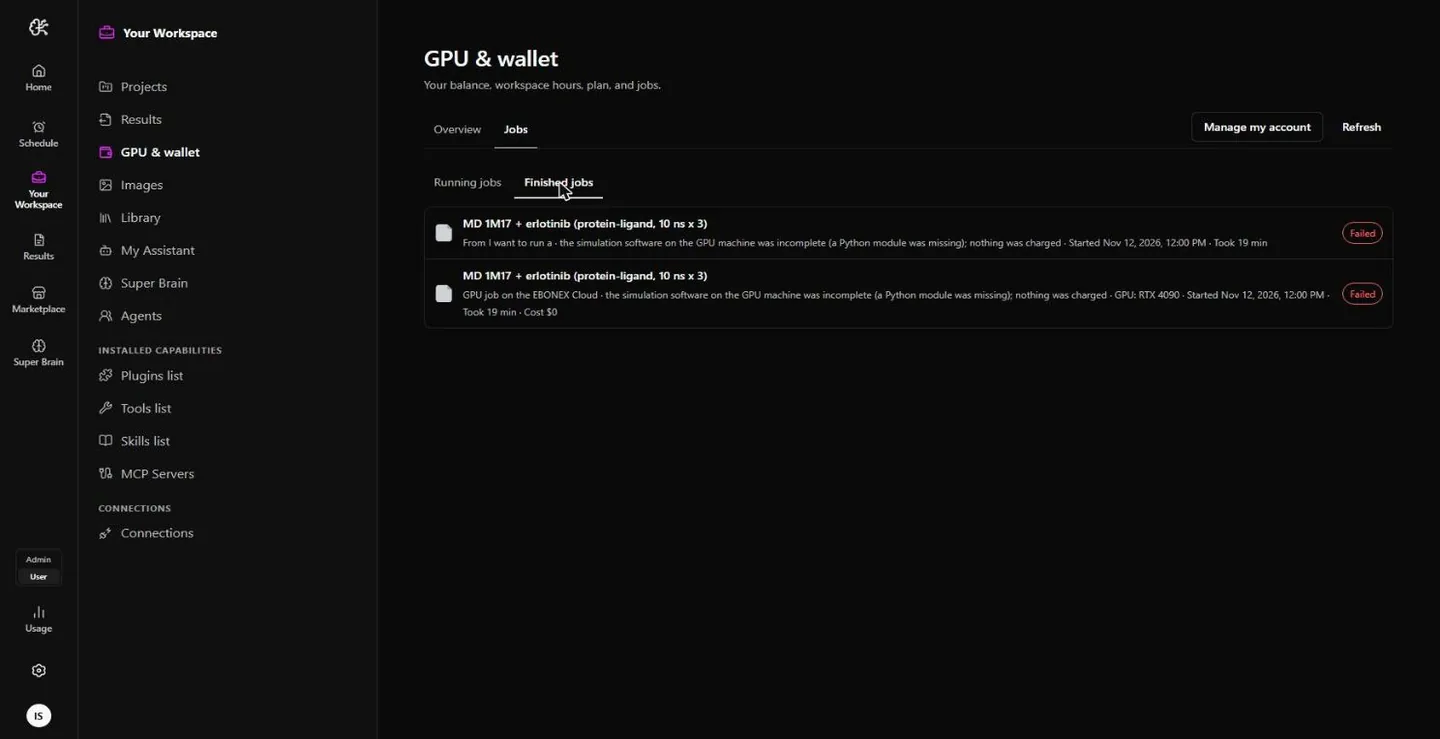
Your running jobs and the files they made. Every finished study is a folder: the report, the figures, the tables and the raw numbers they were drawn from, plus a way back to the conversation that produced them. A job that failed is kept too, with the reason it failed and a cost of zero — you are not charged for work that did not happen.

ebonex.co.uk
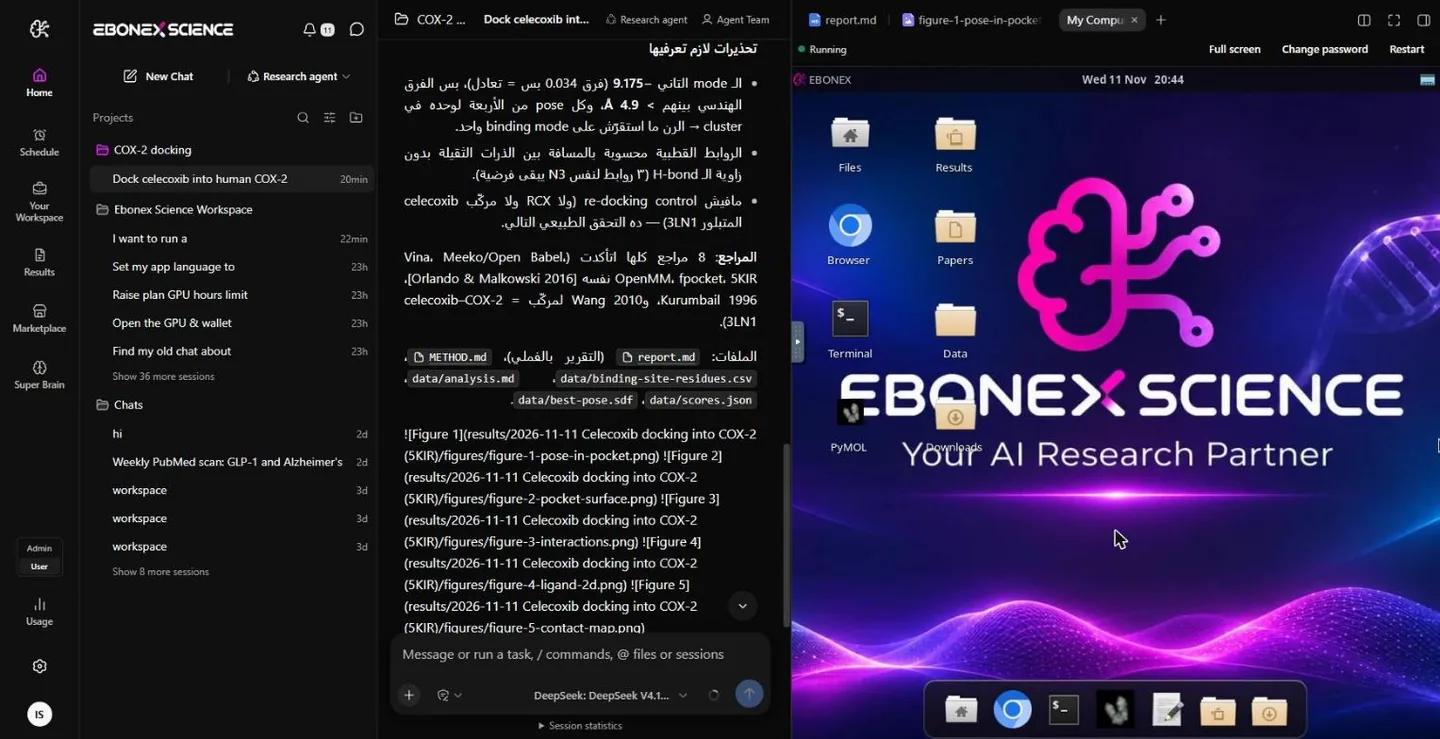
My Computer: the desktop of your own cloud machine, inside the app

My Computer

A Linux machine of your own in the cloud, with a desktop, a terminal, a browser and the scientific tools installed. You can watch it work, or ignore it entirely. It stays awake while you sleep, which is the whole point of long work: you ask in the evening and read the answer in the morning. Beside it sit Images — every figure with the chat that made it — and the Library, your files as cards marked by where they came from.

GPU, Wallet, Usage, Profile

You can always see what you are spending.

No invoice that surprises you, because the number was on screen before the work started.

ebonex.co.uk
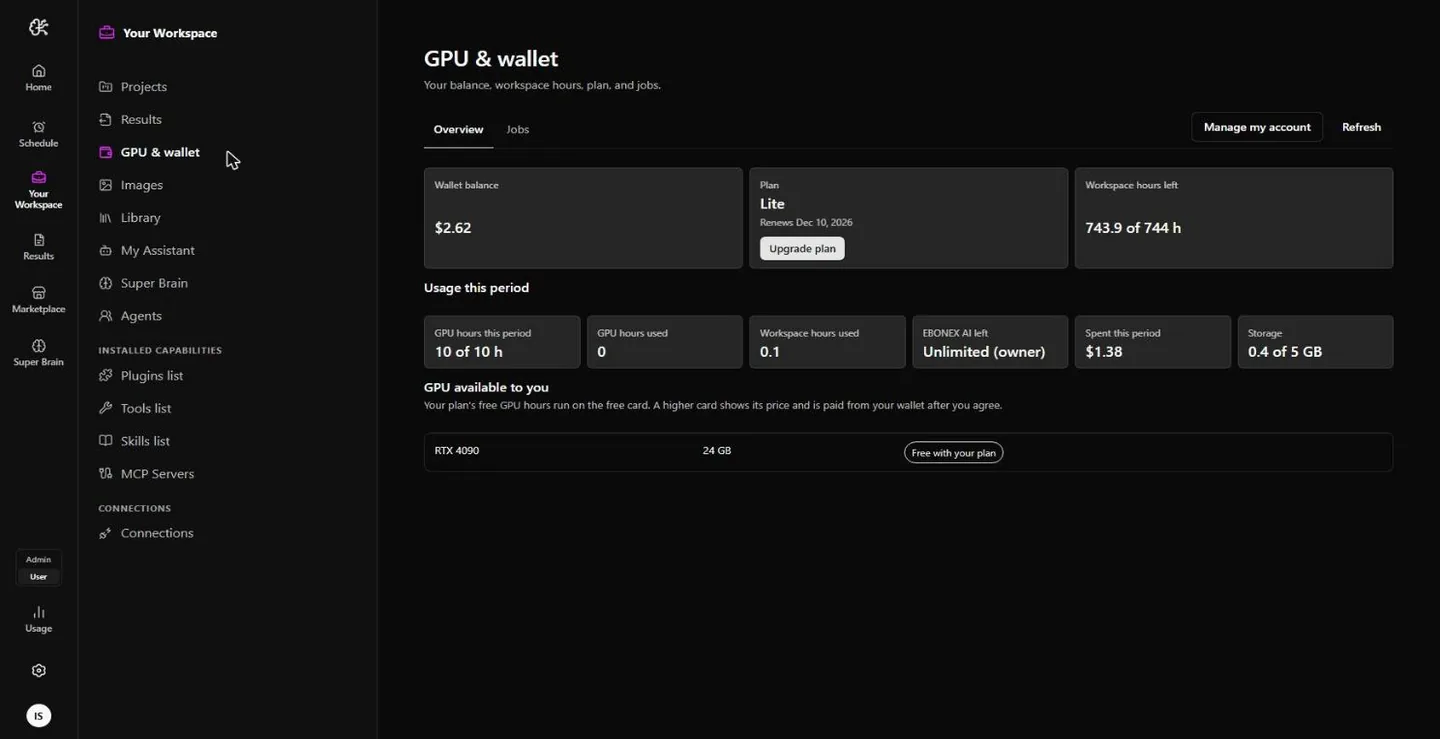
GPU & Wallet: balance, plan, workspace hours and GPU hours

GPU & Wallet

One page with your balance, your plan, your workspace hours and your GPU hours. The plan’s credits renew each month; credit you add yourself is kept apart from them and spent only after you have approved the job that spends it. Every heavy job is estimated before it runs and reconciled after, against the hours it actually used. See what each plan includes.

ebonex.co.uk
Finished jobs, including a failed run shown with its reason and zero cost

Usage, and what an institution account changes

Usage shows what this account used — AI requests, spend, workspace hours — down to the individual request, with the model and the effort it was run at. Your profile is where that becomes institutional: enter the code your university or organisation gave you and your account joins its plan and its discount, and the administrators who run that programme can see the department and specialty you gave in order to review it. Without a code, nothing about you is visible to anyone: an ordinary account is yours alone, and its workspace is reachable by no other account.

In your field

What this means if you do computational chemistry.

The same shape holds for any field whose work is reading, computing and writing up. Here is the one we use every day, named properly.

ebonex.co.uk
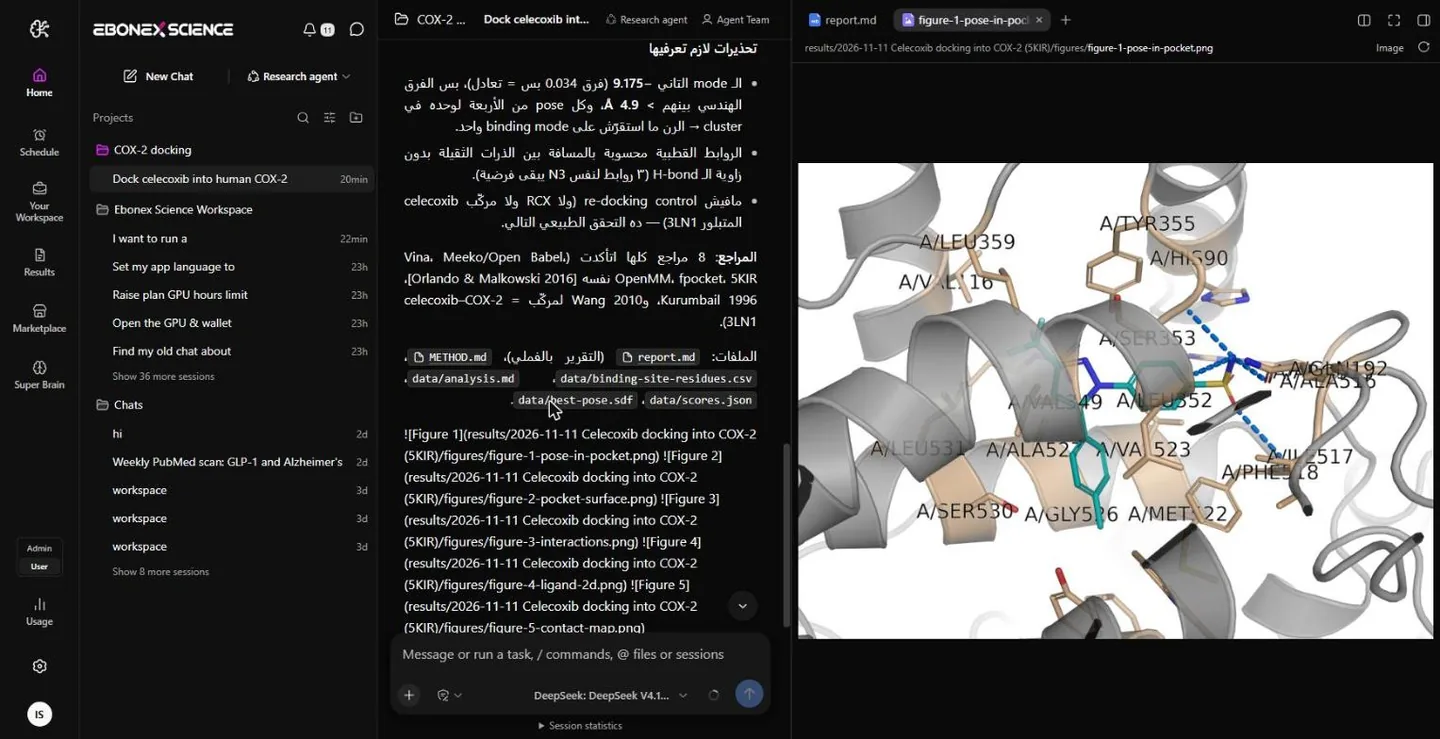
The best docking pose in the binding pocket, with the contacting residues labelled

Docking, molecular dynamics, pharmacophore, drug discovery

You ask for a docking study against a target and you get the structures fetched, the ligands prepared, the run done, the best pose rendered in its pocket with the contacting residues labelled, and the study written up. You ask for molecular dynamics and the run goes to a graphics card, with its hours priced before it starts and its analysis and figures produced when it ends. Pharmacophore work, screening, the whole drug-discovery sequence — it is the same conversation, in Arabic or English, and you never open a separate program to do any of it.

Literature and review work The papers behind your question read end to end, including the ones that disagree with you, with every reference checked against its source.
Data you already have Measurements cleaned, analysed, tested and plotted, with the method written out and the raw numbers kept beside the figure.
The writing up Abstract, methods, results, discussion, limitations and references, in PDF and Word, in the voice of a careful colleague.
Build your own

If you do it twice, make it a tool.

A tool is your method, written down in a form the agent can call — and once it exists, everyone who needs it can have it.

ebonex.co.uk
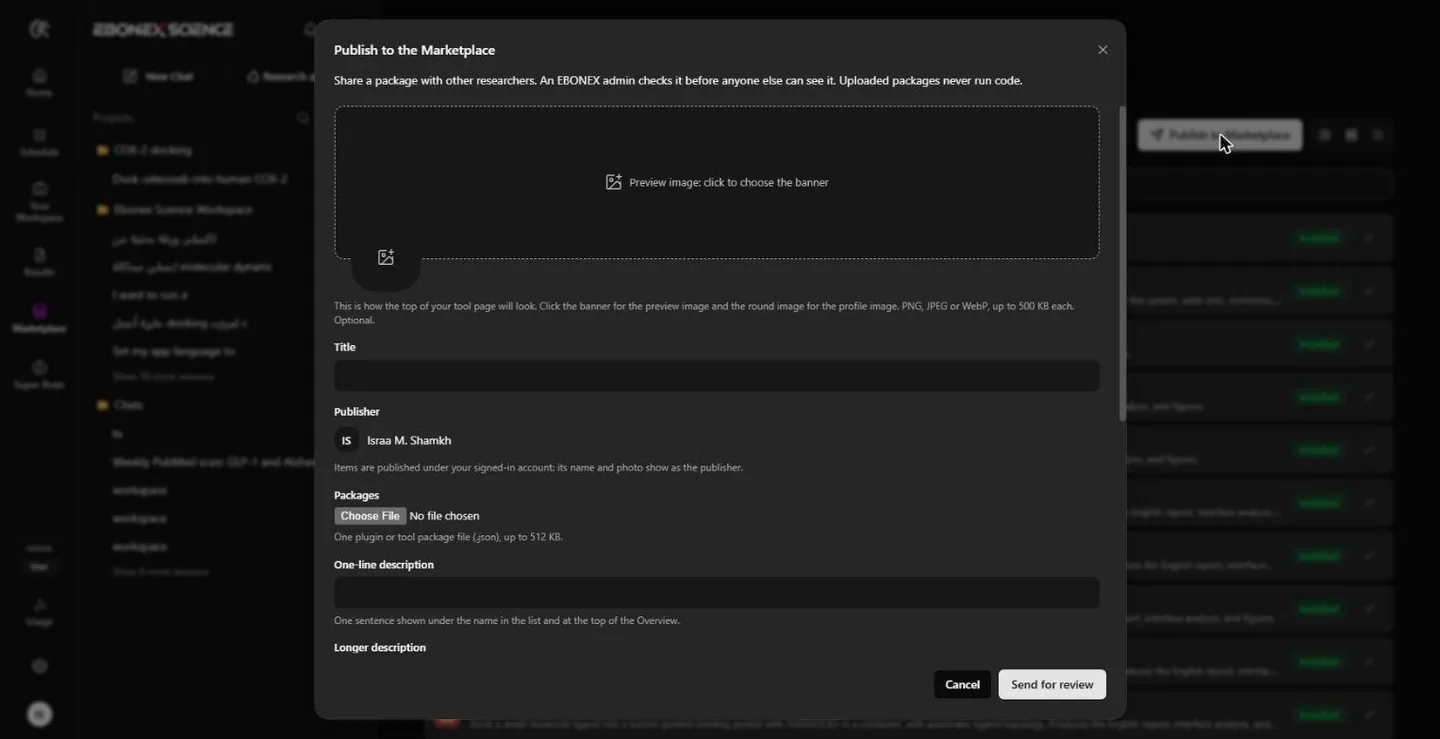
The Publish to the Marketplace form

From a protocol you repeat to a package other labs install

Most researchers have one procedure they run over and over, with the same preparation, the same parameters and the same checks. That is a tool. If what you have is knowledge rather than a program — a protocol, a review standard, the way your group writes a methods section — that is a skill, and a declarative plugin carrying it is a single JSON file you can write by hand and publish today, with no code in it at all. Upload it from the Marketplace, send it for review, and it reaches every researcher who needs it. The Documentation has the exact formats, the limits and worked examples.

For institutions and research groups If your department has methods worth standardising, publish them as a package: everyone in the group runs the same procedure, the same way, with the same checks, and new members inherit it instead of being taught it. Write to support@ebonex.co.uk about an institution programme.
Reviewed before it reaches anyone Every package is validated, scanned and read by an administrator before it goes live, and what it is allowed to touch is listed for the researcher before they add it.
Your copy stays yours Adding a package copies it into your own library rather than linking to someone else’s. If the publisher pauses it tomorrow, what you already added keeps working.
EBONEX Start now

All of this is behind one sentence.

Open EBONEX, describe what you need, and let the workspace assemble itself around the question.